 TeamVista
1The flag
A flag tells you where to look. It can’t tell you why.
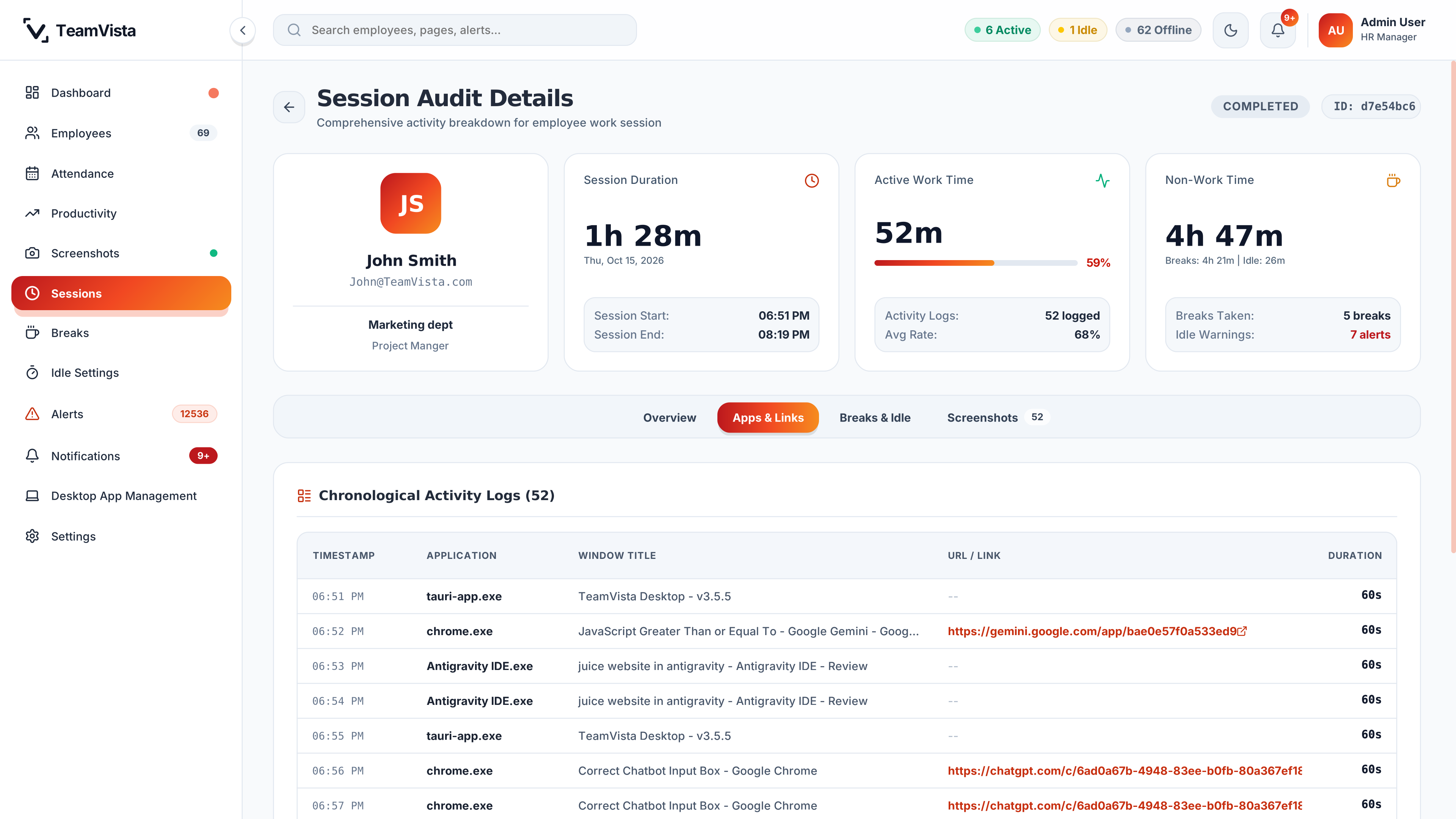
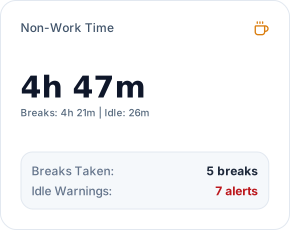
In this sample session: 4 hours 47 minutes of non-work time, 5 breaks taken and 7 idle warnings. Break and idle history highlights recorded events so you know where to start.
09:00Employee monitoring & workforce analytics software
TeamVista puts attendance, activity, screenshots and alerts in one review workflow. Managers check what was recorded around a flag, then start the conversation with a better question.
$2,000/yearFlat software fee. Unlimited tracked team-member accounts, no per-seat charge.
For owners and operations leaders at service companies with 40–80 tracked people on Windows or macOS that already use transparent, screenshot-based review.

TeamVista interface, sample data
09:17How a review works
An idle alert or an attendance gap raises a question, not an answer. TeamVista lets owners and managers check the session, the recorded activity and the available screenshots around it, so the follow-up starts from what the records show.
1The flagStep 1 of 5
In this sample session: 4 hours 47 minutes of non-work time, 5 breaks taken and 7 idle warnings. Break and idle history highlights recorded events so you know where to start.
1The flag
In this sample session: 4 hours 47 minutes of non-work time, 5 breaks taken and 7 idle warnings. Break and idle history highlights recorded events so you know where to start.
2The session
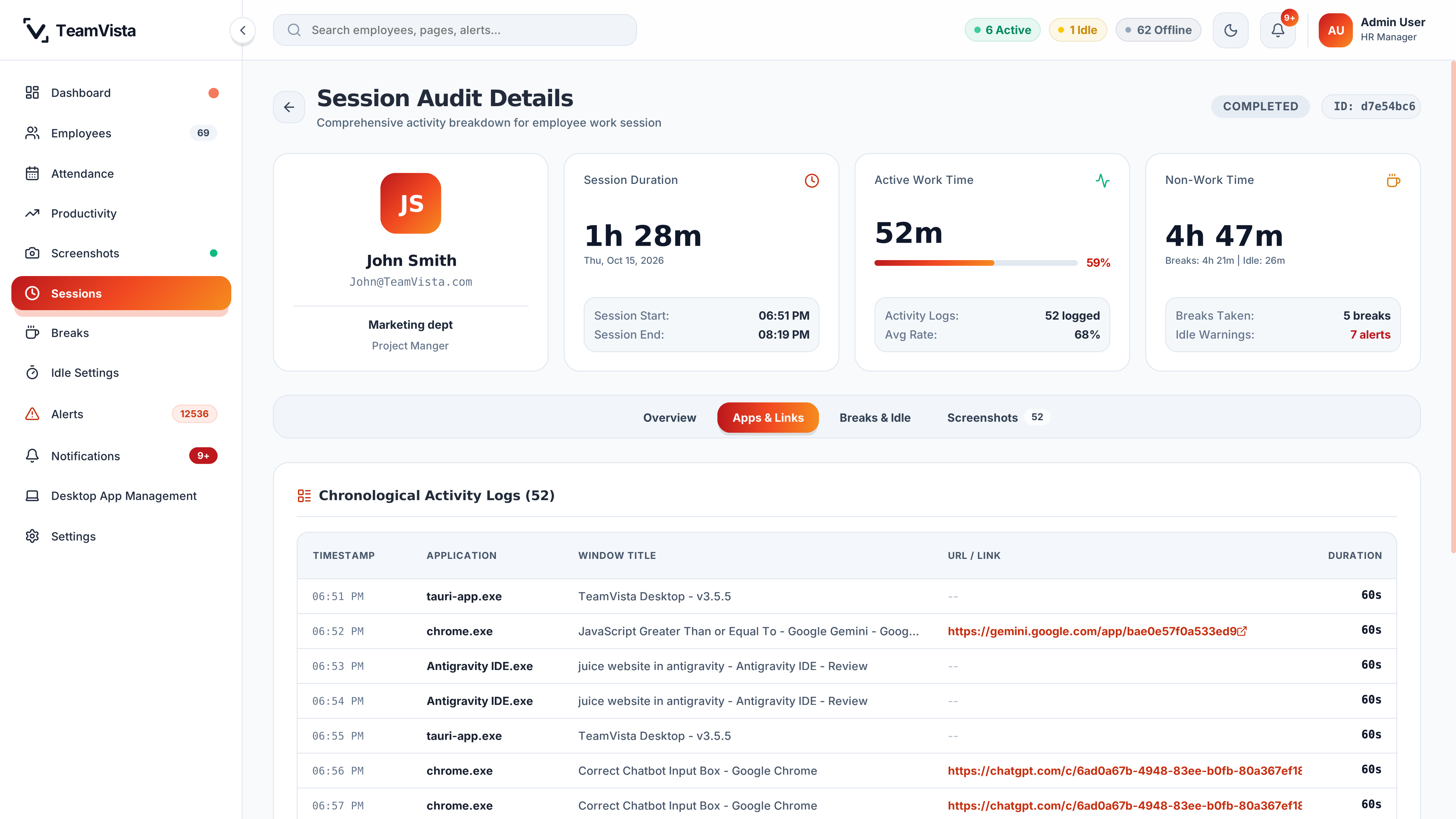
Session timing (1h 28m) and active work time (52m) sit side by side. Compare recorded duration against assigned hours before treating a gap as an issue.
3The sequence
Chronological activity logs list recorded applications, window titles, URLs and durations in exact order, showing the context surrounding the flagged period.
4The captures
Examine the screenshots tab captures around the flagged period. Captures provide visual ground truth to clarify context before reaching a verdict.
5The question
Separate what the records show from what still needs an explanation. TeamVista does not assemble evidence or make decisions about people. The explanation comes from the conversation.
10:24Alerts and screenshots
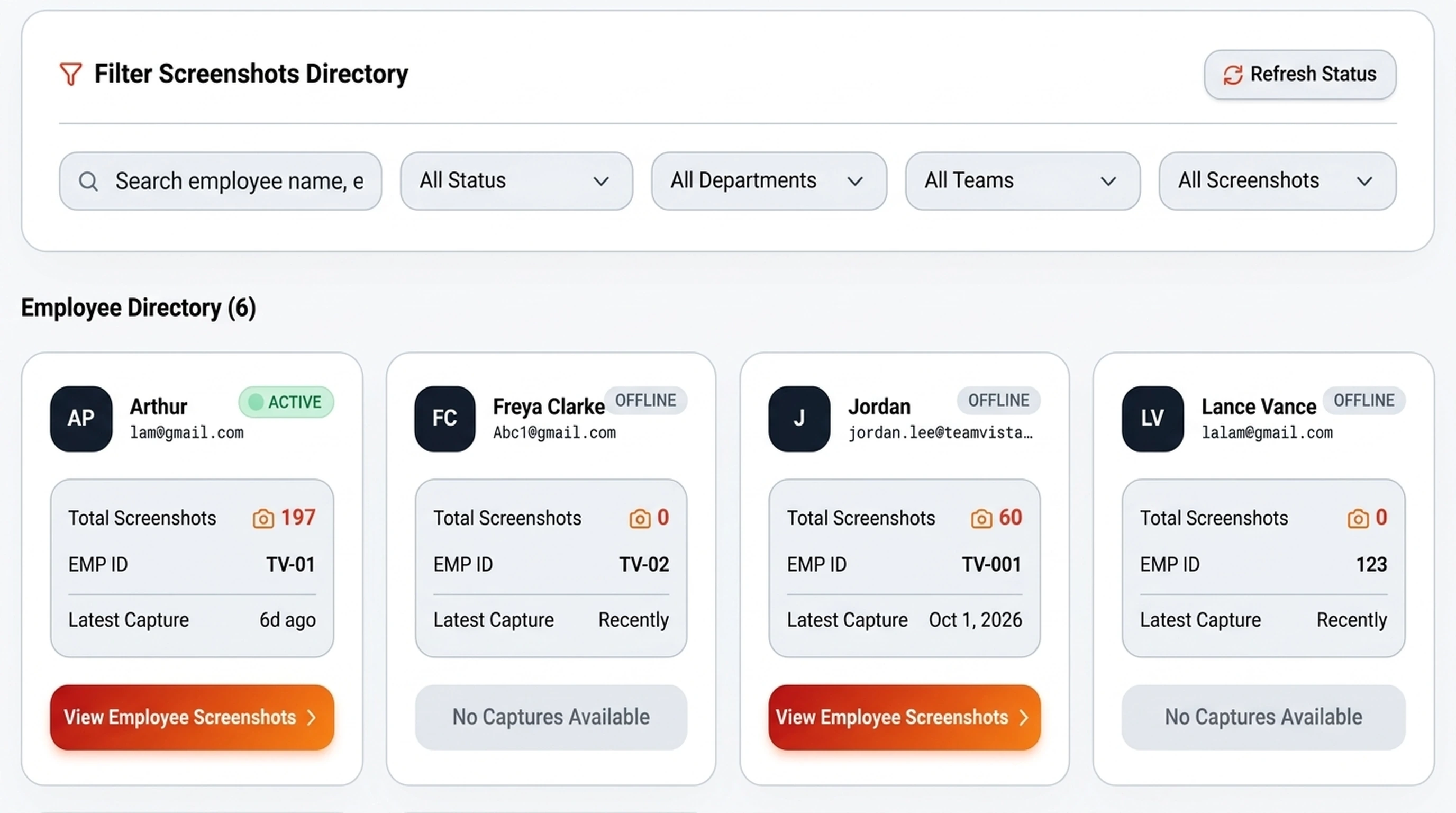
Two views do most of the work before a conversation: the alert log and the screenshot directory.
Alert views include person, team, time, severity, and status filters, plus acknowledgment and resolution controls. Inspect the relevant records before deciding what a flag means.
Acknowledged and resolved are review statuses. A resolved status marks a review step; it is not proof that the underlying concern was addressed.
Screenshot review includes a gallery, time navigation, filters, previews, and timelapse controls. Use available captures to examine the period that raised the question.
Compare the captures with the session and app history. A single image is a reason to inspect the surrounding record, not a reason to skip the conversation.
This view shows the screenshot directory only, with no captured employee desktop content.
11:30The context behind the rule
Check the schedule and the rule before treating an exception as a problem. The same signal can call for different questions in different jobs.
Attendance views include clock-in and clock-out records, shift context, and present, late, absent, and leave summaries. Use the schedule as context when a start, finish, or absence needs investigation.
Break and idle settings include department, team, role, and individual assignments. App and URL policy controls include global, department, team, and individual targets.
Activity, app-category, and peak-hour views offer recorded signals and derived indicators to inspect alongside the task and the person’s explanation.
Can showClock-in and clock-out records, shift context, and present, late, absent, and leave summaries
Can’t showPayroll or billing output; confirm calculations and leave or off-day handling before operational use
Can showThe applications and links recorded around the question, with break and idle history
Can’t showIntent, work quality, or what happened away from the screen
Can showThe available captures before and after the flagged period
Can’t showA continuous or complete record, or intent
Can showPerson, team, time, severity, and status, with acknowledgment and resolution controls
Can’t showWhether the underlying concern was addressed
11:52Where the records stop
What was happening during this period, and what might the records be missing?
After examining the available records, separate what you know from what still needs an explanation. Carry that distinction into the conversation. The follow-up conversation happens outside TeamVista; the product does not log it or make decisions about people.
12:40Pricing
At 40, 60 or 80 tracked people, the TeamVista software fee is $2,000 per year. The selected plans below multiply a published seat or user rate, or a five-user pack price, by the number of people tracked. That is a difference in pricing model, not a claim that the products do the same job.
Annual software list price at
40 tracked people
Selected paid entry plans, annual software list prices in USD, checked 21 September 2026. The products and plans are not equivalent. This table compares software pricing models, not features or total cost of ownership. It shows selected paid entry plans, not every plan, free option, custom quote or deployment.
TeamVistaAnnual software fee
$2,000/year
For monthly rates in the annual-billing column: rate × 12 × tracked people.
For annual per-user rates: rate × tracked people.
For the Teramind AWS option: round tracked people up to the next five-user pack, then multiply packs by $828/year.
These examples assume the stated tracked population; any additional paid owner or manager accounts are extra.
Source details: [Hubstaff seat rules](https://support.hubstaff.com/per-seat-pricing/); [Time Doctor billing](https://support.timedoctor.com/knowledge/billing-faqs); [ActivTrak pricing and support](https://www.activtrak.com/pricing/); [ActivTrak plan licensing](https://support.activtrak.com/hc/en-us/articles/360027324491-ActivTrak-s-Subscription-and-Support-Plans-Licensing-and-Pricing); [Teramind pricing page](https://www.teramind.co/services/price/); [Teramind vendor article](https://www.teramind.co/blog/time-doctor-vs-teramind/); [Insightful pricing](https://www.insightful.io/pricing). Accessed 21 September 2026.
13:30Who it’s for
If your current process already handles the job well, another dashboard is not enough reason to change. If it leaves relevant records scattered or the review difficult to carry through, evaluate TeamVista against that specific problem.
TeamVista is for transparent, disclosed monitoring only. We do not offer it for covert monitoring or automated employment decisions. Workforce notice, acceptance and legal approval remain your organization’s responsibility.
13:48Before you request
Bring the review problem that could justify a switch. Decide what a replacement must demonstrate, not only what it must cost.
Identify the person, period and records needed to prepare a specific question. Keep human follow-up separate from an alert status.
Define the purpose of collection, what workers are told, and how they can question a record.
Assess endpoints, access paths, external processing, retention and deletion. Review the documented access tests before any real workforce data is loaded.
Compare the written software scope, infrastructure charges, onboarding, support and internal effort. A lower license fee alone is not a lower total cost.
14:20Security and storage
Before your organization loads real workforce data, we test and document the access paths across the application, backend, screenshot storage and any AI interface, and your evaluation includes that review. Judge access by those results, not by the settings shown on screen.
TeamVista runs on storage and related infrastructure that your organization provides and pays for. Set the storage, retention, bandwidth and processing capacity you need. These costs and responsibilities are separate from the software fee.
Hosting location alone does not settle who can access records. Deployment ownership, vendor and service access, external processing, retention and deletion are agreed in writing and tested during evaluation.
Define how long session and screenshot records are needed, who owns the policy, and what deletion must cover. Cleanup settings are a starting point for that discussion.
TeamVista’s desktop apps for Windows and macOS capture the same records. Linux is not supported, and setups with more than three monitors are outside the supported desktop scope.
Capture is skipped while a workstation is locked and on workstations with more than three monitors. Test installation, permissions and updates on your own Windows and macOS workstations before rollout.
Define the purpose of collection, how your workforce is told, and how people can question a record. Buying software or requesting an evaluation does not provide legal approval or workforce consent.
Identify who will roll out endpoints, maintain application and infrastructure services, manage access, review exceptions and handle support. Agree what your team owns and what the written delivery scope includes.
15:05Beyond the core offer
Start with a work-review question, then evaluate how an AI tool would use the relevant records. TeamVista’s MCP interface and owner-facing assistant sit outside the core offer. They are not ready-to-use integrations, and they do not make decisions about people.
TeamVista includes a Model Context Protocol (MCP) server interface, available as a private preview. It defines six tools for review data. Each connection is tested before it is used with real workforce data.
Verify the connection, access, and data flow before use. Compatibility with a specific AI client is not confirmed. Access through the MCP interface is tested and documented before it reaches real workforce data. AI processing can involve external providers, so records may leave your environment; agree the data flow in writing before use.
Chat and report interfaces for owners are in development in the owner application. They are not part of the core offer, and the HR application does not include an AI assistant.
15:25Discovery call
Schedule a private 1:1 conversation with our team. Tell us your workforce requirements, walk through your existing review process, and see how TeamVista fits your operations before rollout.
15:40The fine print, in plain sight
Sixteen boundaries we would rather you read now than discover during rollout.
14:05What it covers
One session record connects attendance, time tracking, screenshots, application activity and alerts, so managers review the full context before they follow up.
TeamVista is employee monitoring software built for disclosed, consent-based review. The Windows and macOS desktop app shows a visible indicator, and capture pauses when the workstation is locked or the shift ends. It does not log keystrokes, access webcams or record audio.
Track employee attendance against the assigned shift, with clock-in and clock-out times, work hours, break history and idle time in one session record. Managers and HR get attendance calendars and a live team floor view for in-office, hybrid and remote employees.
Periodic desktop screenshots sit beside the session timeline, so a reviewer sees the screen around a flag rather than a lone number. Multi-monitor capture covers up to three displays per workstation.
Review active application and website activity in chronological order, plus active and idle time, instead of judging a day from one summary figure. It is employee activity tracking meant to start a conversation, not deliver an automatic verdict.
Managers, HR and owners work from dashboards for team activity, attendance and performance trends. It gives distributed teams workforce analytics without a separate reporting stack.
Set alert rules by team and role, then acknowledge and resolve them as review steps. Role-based permissions limit who sees what, and screenshots and telemetry stay in storage your organization controls, with a flat $2,000/year software fee for 40–80 tracked people.
16:15Common questions
Start with a recent review your current process struggled to handle. Compare the records you can inspect, the follow-up required, and the full operating commitment. If your current setup already meets the need, TeamVista has to earn a reason to replace it.
Compare the written software scope, provider charges, onboarding and support responsibilities, and your team’s operating effort. Assess any planned AI use separately. A license fee alone is not the total cost, and a different setup is not proof of savings.
On Windows and macOS, TeamVista captures periodic screenshots and records activity and app and window context. Review views cover sessions, attendance, app and link history, and alerts. These are the available records, not a continuous or complete account of someone’s work.
Yes. TeamVista collects screenshots and activity data. It is for transparent work review, and we do not offer it for covert monitoring. Before rollout, define the purpose, tell your workforce, and give people a way to question the records.
No. Recorded activity does not establish intent, work quality, or everything that happens away from the screen. Activity and risk indicators are prompts for human review, not performance verdicts or health diagnoses.
Access is managed through role and assignment controls and multi-factor authentication settings in the HR application. Before your organization loads real workforce data, we test and document the access paths across the application, backend, screenshot storage and any AI interface, and your evaluation includes that review.
Not as part of the core offer. The MCP interface for AI tools is a private preview, and the owner-facing assistant is in development. Compatibility with a specific AI client is not confirmed. External MCP access is enabled only after a separate readiness review, including access testing, and approval.
Windows and macOS are supported with the same features. Linux is not supported. Capture is skipped on locked workstations and on setups with more than three monitors. Confirm the behavior your workstations need during evaluation.
TeamVista runs on storage and infrastructure your organization provides, and screenshot storage and retention stay under your control. Hosting location alone does not settle who can access records. Vendor and service access, deployment ownership, external processing, retention and deletion are agreed in writing and tested during evaluation.
No. Acknowledged and resolved are review statuses, not proof that a workforce concern is solved. A configured setting is not evidence that a change saved, a rule is enforced, a notification was delivered or a record was deleted. Test the behavior you rely on during evaluation.
16:45Start with one review
Describe the period, the records your team checked, and what remained unclear. Use that example to assess TeamVista’s review workflow, the requirements it would need to meet, and the operating commitment behind a switch.
Keep employee names, screenshots, and confidential work content out of the initial request. You can describe the problem without sharing the records.
A request starts an evaluation. It is not a purchase, production access or an approved rollout.